Free LLM HTML Visibility Checker
See your website through the eyes of an AI crawler. ChatGPT, Claude, and Perplexity bots don't run JavaScript — they only see your raw HTML. This free scanner shows you exactly what they see, flags rendering issues, missing metadata, and content gaps that make your site invisible to AI. Free, unlimited, no signup.







What is an LLM HTML visibility checker?
An LLM HTML visibility checker fetches the raw HTML response from your URL — the same HTML that AI crawlers like GPTBot, ClaudeBot, PerplexityBot, and Google's Gemini crawler receive when they visit your page. Unlike Googlebot (which renders JavaScript), most AI crawlers only see what's in the initial server response. Content loaded by React, Vue, Angular, or any AJAX call after page load is completely invisible to them. This tool scans your raw HTML for client-side rendering signals, missing metadata, broken heading structure, and content gaps — then returns a prioritized action plan to make your site readable by AI.
How to use the LLM HTML visibility checker
Paste your URL (https://example.com/page) and click Scan Page. The tool fetches the raw, unrendered HTML, parses it for client-side rendering signals (empty SPA shells, JS-loaded content), extracts page metadata (title, meta description, canonical, structured data, Open Graph), checks heading structure and image alt coverage, and detects the underlying tech stack (Next.js, Nuxt, React, Shopify, Webflow, Framer, etc.). You get a 0–100 LLM visibility score, a top-5 prioritized action plan, full metadata breakdown, and content stats. Run it on every key page, fix the criticals, re-scan to verify. Free, unlimited.
What is an LLM HTML visibility checker?
An LLM HTML visibility checker fetches the raw HTML response from your URL — the same HTML that AI crawlers like GPTBot, ClaudeBot, PerplexityBot, and Google's Gemini crawler receive when they visit your page. Unlike Googlebot (which renders JavaScript), most AI crawlers only see what's in the initial server response. Content loaded by React, Vue, Angular, or any AJAX call after page load is completely invisible to them. This tool scans your raw HTML for client-side rendering signals, missing metadata, broken heading structure, and content gaps — then returns a prioritized action plan to make your site readable by AI.
How to use the LLM HTML visibility checker
Paste your URL (https://example.com/page) and click Scan Page. The tool fetches the raw, unrendered HTML, parses it for client-side rendering signals (empty SPA shells, JS-loaded content), extracts page metadata (title, meta description, canonical, structured data, Open Graph), checks heading structure and image alt coverage, and detects the underlying tech stack (Next.js, Nuxt, React, Shopify, Webflow, Framer, etc.). You get a 0–100 LLM visibility score, a top-5 prioritized action plan, full metadata breakdown, and content stats. Run it on every key page, fix the criticals, re-scan to verify. Free, unlimited.
What you can do with our free LLM HTML visibility checker
Six high-leverage workflows — diagnose CSR rendering issues, audit competitor sites, validate SSR migrations, fix missing metadata, score key landing pages, and verify your content is actually readable by AI crawlers.
What you can do with our free LLM HTML visibility checker
Six high-leverage workflows — diagnose CSR rendering issues, audit competitor sites, validate SSR migrations, fix missing metadata, score key landing pages, and verify your content is actually readable by AI crawlers.
Diagnose invisible-to-AI pages
If your traffic from AI sources is suspiciously low, your pages might not be readable by AI crawlers. The scanner instantly tells you whether GPTBot, Claude, and Perplexity see content or just an empty SPA shell — the fastest way to confirm whether you have a rendering problem before investing in fixes.
Diagnose invisible-to-AI pages
If your traffic from AI sources is suspiciously low, your pages might not be readable by AI crawlers. The scanner instantly tells you whether GPTBot, Claude, and Perplexity see content or just an empty SPA shell — the fastest way to confirm whether you have a rendering problem before investing in fixes.
Verify SSR migrations
Migrated your React or Vue app to Next.js or Nuxt for SEO? Run the scanner before and after to confirm SSR is actually shipping content in the raw HTML. Catches half-finished migrations where SSR works on the homepage but not on key landing pages.
Verify SSR migrations
Migrated your React or Vue app to Next.js or Nuxt for SEO? Run the scanner before and after to confirm SSR is actually shipping content in the raw HTML. Catches half-finished migrations where SSR works on the homepage but not on key landing pages.
Audit competitor AI visibility
Run any competitor URL through the scanner. See whether they're optimized for AI crawlers or shipping a JS-rendered shell. Adjacent insight: if they're winning AI citations with weak HTML, your better-rendered content has even higher upside once it's published with the right structure.
Audit competitor AI visibility
Run any competitor URL through the scanner. See whether they're optimized for AI crawlers or shipping a JS-rendered shell. Adjacent insight: if they're winning AI citations with weak HTML, your better-rendered content has even higher upside once it's published with the right structure.
Catch missing metadata before publish
Scan staging URLs to verify title, meta description, canonical, Open Graph, and JSON-LD structured data are all in place — before content goes live. Catches the "we forgot OG tags" problem at deploy time, not after a competitor steals your AI citation.
Catch missing metadata before publish
Scan staging URLs to verify title, meta description, canonical, Open Graph, and JSON-LD structured data are all in place — before content goes live. Catches the "we forgot OG tags" problem at deploy time, not after a competitor steals your AI citation.
Score every key landing page
Run the scanner on your homepage, top 10 blog posts, and top 5 product pages. Anything scoring below 70 gets a fix queue. Result: every revenue-driving page is actually readable by AI crawlers, not just the ones you happened to test.
Score every key landing page
Run the scanner on your homepage, top 10 blog posts, and top 5 product pages. Anything scoring below 70 gets a fix queue. Result: every revenue-driving page is actually readable by AI crawlers, not just the ones you happened to test.
Validate Webflow / Framer / Squarespace builds
Drag-and-drop site builders sometimes ship JS-rendered content even when they advertise SSR. Scan a published Webflow, Framer, or Squarespace page to verify your content is actually in the raw HTML — not lazy-loaded into an empty shell at runtime.
Validate Webflow / Framer / Squarespace builds
Drag-and-drop site builders sometimes ship JS-rendered content even when they advertise SSR. Scan a published Webflow, Framer, or Squarespace page to verify your content is actually in the raw HTML — not lazy-loaded into an empty shell at runtime.
SERP & Rankings
Technical SEO
AI Writing & Content
Keyword Research
AI Visibility
Social & YouTube
How AIclicks works
How AIclicks works

01

Brand Audit
We start by mapping your current AI visibility, analyzing how often you appear in LLMs answers. This gives us a precise roadmap of what needs to be fixed, improved, or created.
01
Brand Audit
We start by mapping your current AI visibility, analyzing how often you appear in LLMs answers. This gives us a precise roadmap of what needs to be fixed, improved, or created.
02
AI-Optimized Content
We produce content crafted specifically for AI models. We reinforce this with citation-worthy sources and high-authority mentions that help AI systems trust and reference your brand.
02
AI-Optimized Content
We produce content crafted specifically for AI models. We reinforce this with citation-worthy sources and high-authority mentions that help AI systems trust and reference your brand.
03
Optimization, Tracking & Insights
You get access to a custom AI visibility dashboard, weekly progress updates, and continuous optimization cycles. We monitor ranking shifts, citation changes, competitors, and new AI opportunities.
03
Optimization, Tracking & Insights
You get access to a custom AI visibility dashboard, weekly progress updates, and continuous optimization cycles. We monitor ranking shifts, citation changes, competitors, and new AI opportunities.
Explore our blog
Explore our blog


FAQ
Why don't AI crawlers run JavaScript?
Running JavaScript at scale is computationally expensive — every rendered page costs orders of magnitude more than fetching raw HTML. Most AI crawlers (GPTBot, ClaudeBot, PerplexityBot) skip rendering to keep crawl costs manageable. Google is the main exception: Googlebot renders JS, which is why Google's AI Overviews and Gemini often see more content than ChatGPT or Claude do. For maximum AI visibility, ship important content in the initial HTML response, not via post-load JS.
What's a "client-side rendering (CSR) shell"?
A CSR shell is a near-empty HTML page that ships only a root container element (typically marked id="root" or id="app") with all real content rendered by JavaScript at runtime. Common with React, Vue, Angular, and Svelte single-page apps without server-side rendering (SSR). For users with browsers, content appears normally. For AI crawlers without JS, the page looks empty — they read nothing, cite nothing, and rank you nowhere.
How accurate is this scanner?
It's a fast triage tool, not a definitive audit. Highly accurate at the extremes: empty SPA shells get flagged as critical reliably; substantial server-rendered pages score high reliably. Less accurate on the middle band — hybrid pages with skeletal SSR but JS-loaded substantive content can score artificially high because a static-HTML scanner can't distinguish "thin marketing copy" from "complete content." Treat scores as directional. For deeper analysis, pair with Google Search Console's URL Inspection (which shows you exactly what Googlebot sees) and run targeted SSR-vs-CSR comparisons.
What's the fix if my page scores poorly?
Depends on the issue. CSR shells need server-side rendering (SSR), static-site generation (SSG), or pre-rendering for crawlers — that's a framework migration on Next.js, Nuxt, Remix, or similar. Missing metadata is usually a quick fix in your CMS or template. Missing JSON-LD structured data is a one-time copy-paste schema implementation. Heading structure and content depth issues are content-team work, not engineering. The scanner's action plan ranks fixes by impact so you tackle the framework-level issues first.
Is this scanner really free?
Yes. Unlimited scans, no signup, no credit card. Run it on every URL on your site, then run it on competitors. The scanner's value compounds when you make it a habit — pre-publish QA, post-deploy verification, monthly competitor audits. No paywall, no usage cap.
FAQ
Why don't AI crawlers run JavaScript?
Running JavaScript at scale is computationally expensive — every rendered page costs orders of magnitude more than fetching raw HTML. Most AI crawlers (GPTBot, ClaudeBot, PerplexityBot) skip rendering to keep crawl costs manageable. Google is the main exception: Googlebot renders JS, which is why Google's AI Overviews and Gemini often see more content than ChatGPT or Claude do. For maximum AI visibility, ship important content in the initial HTML response, not via post-load JS.
What's a "client-side rendering (CSR) shell"?
A CSR shell is a near-empty HTML page that ships only a root container element (typically marked id="root" or id="app") with all real content rendered by JavaScript at runtime. Common with React, Vue, Angular, and Svelte single-page apps without server-side rendering (SSR). For users with browsers, content appears normally. For AI crawlers without JS, the page looks empty — they read nothing, cite nothing, and rank you nowhere.
How accurate is this scanner?
It's a fast triage tool, not a definitive audit. Highly accurate at the extremes: empty SPA shells get flagged as critical reliably; substantial server-rendered pages score high reliably. Less accurate on the middle band — hybrid pages with skeletal SSR but JS-loaded substantive content can score artificially high because a static-HTML scanner can't distinguish "thin marketing copy" from "complete content." Treat scores as directional. For deeper analysis, pair with Google Search Console's URL Inspection (which shows you exactly what Googlebot sees) and run targeted SSR-vs-CSR comparisons.
What's the fix if my page scores poorly?
Depends on the issue. CSR shells need server-side rendering (SSR), static-site generation (SSG), or pre-rendering for crawlers — that's a framework migration on Next.js, Nuxt, Remix, or similar. Missing metadata is usually a quick fix in your CMS or template. Missing JSON-LD structured data is a one-time copy-paste schema implementation. Heading structure and content depth issues are content-team work, not engineering. The scanner's action plan ranks fixes by impact so you tackle the framework-level issues first.
Is this scanner really free?
Yes. Unlimited scans, no signup, no credit card. Run it on every URL on your site, then run it on competitors. The scanner's value compounds when you make it a habit — pre-publish QA, post-deploy verification, monthly competitor audits. No paywall, no usage cap.
Be the #1 Response in AI
Reach millions of consumers who are using AI to discover new products and brands
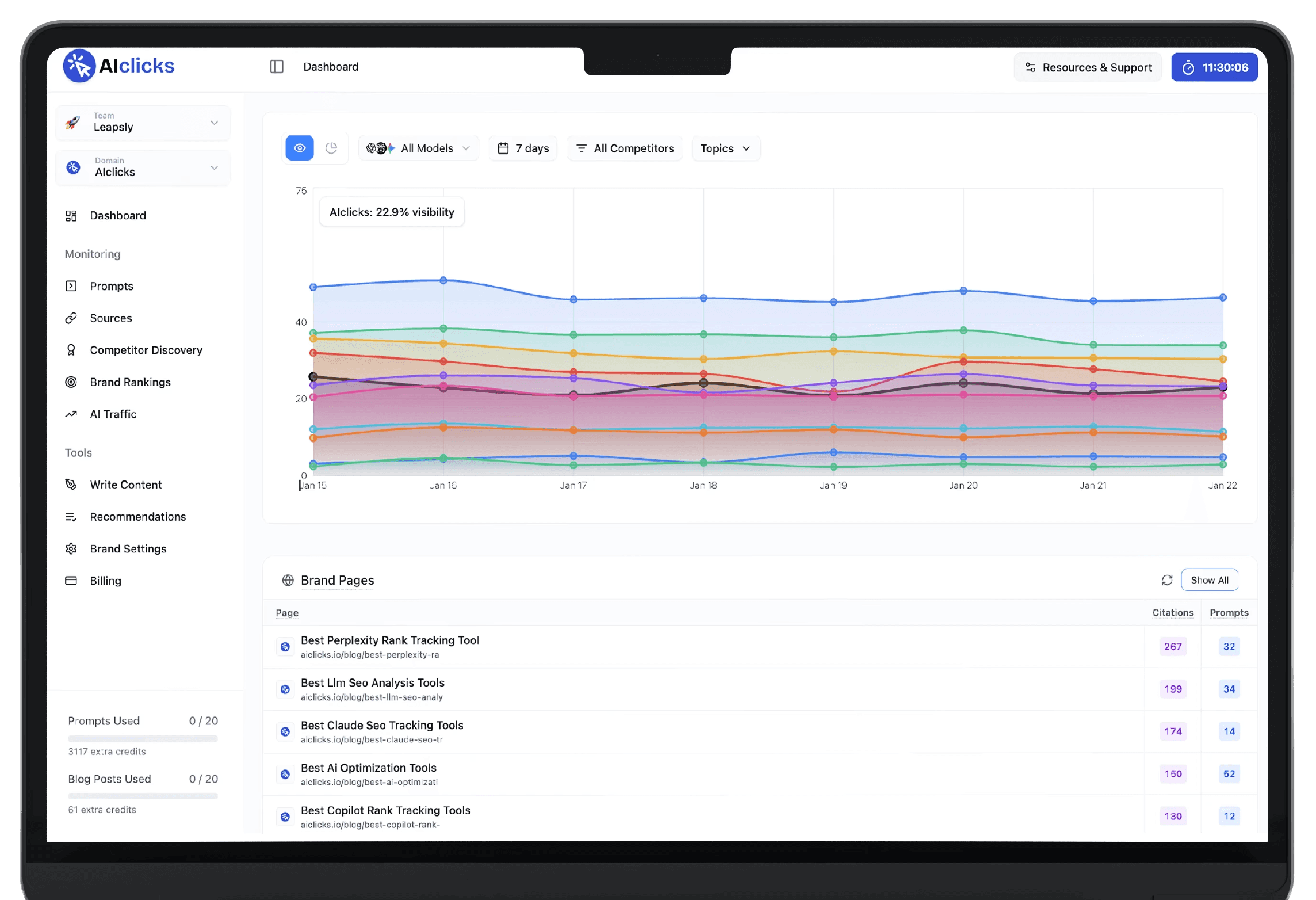
Be the #1 Response in AI
Reach millions of consumers who are using AI to discover new products and brands
Be the #1 Response in AI
Reach millions of consumers who are using AI to discover new products and brands