

Reviewed by:
Rokas Stankevicius

Founder @ aiclicks.io
Last updated:
Expert Verified


Free AI visibility audit
Key Takeaways
There's no prompt volume data in AI search, so the strongest prompt sources are ones with proof attached: GSC question queries with real impressions, competitor ad spend, and referral traffic that already happened.
Your buyers have been writing your prompts for years. Support tickets, sales call transcripts, and Reddit threads hold their exact language, unedited by any marketer.
Filter hard before tracking. If losing an answer to a competitor wouldn't plausibly cost a deal, or you can't influence the answer within two quarters, the prompt doesn't earn a slot.
Keep branded prompts in their own group. Your near-guaranteed visibility on them inflates category averages and hides the comparisons you're actually losing.
Start with 25 to 40 prompts on 2 to 3 engines, run them daily for at least 30 days, and prune monthly. A small set you read consistently beats a big one you can't.
Editorial note: AIclicks is our AI visibility tool, so please read this with that in mind. The trade-off works in your favor though: we've seen more prompt sets built, broken, and rebuilt across live accounts than almost anyone giving advice on this topic.
Every team that gets serious about AI visibility hits the same wall on day one. You sit down to pick prompts to track, and you realize you have no idea which ones matter.
With keywords, the job was obvious. Search volume told you what people looked for, rankings told you where you stood, competitor data told you who you were fighting.
And, prompts hand you none of that. There's no volume, no fixed position, plus two people asking ChatGPT the same question can get completely different brands back, shaped by their history, their location, or nothing you can see at all.
So most teams default to the easy version. They track a handful of "best [category] tool" prompts, watch the dashboard, and call it a strategy. That covers maybe a fifth of how buyers actually talk to AI, and quietly ignores the rest.
This guide covers the full job: why prompts don't behave like keywords, the prompt types your tracking set needs to cover, ten ways to find prompts your buyers actually use, and how to cut a bloated list down to the ones worth paying to track. By the end, you'll be able to defend every prompt in your set with a single sentence.
Learn more about Generative Engine Optimization.
Why Prompts Don't Work Like Keywords
Treating prompts like keywords feels natural, but four differences break the keyword playbook the moment you apply it.
No volume data, ever. No AI platform reports how many people asked a given question, and none has a reason to start. You're choosing prompts without the one number SEO trained you to lean on, which is exactly why sourcing from real buyer behavior (below) matters so much here.
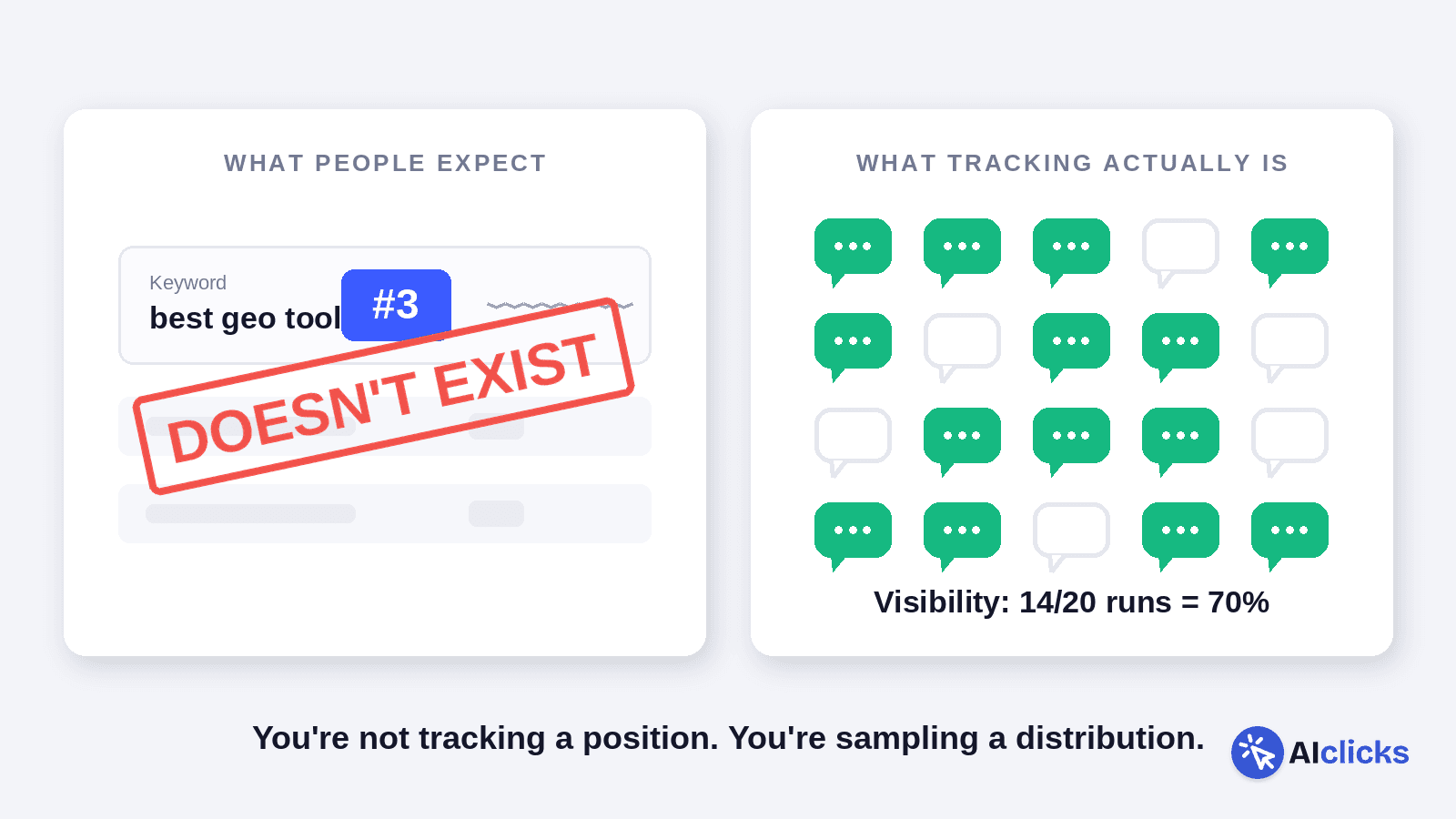
No position to rank for. An AI answer mentions you or it doesn't. There's no "number three," so the question becomes whether you show up at all, and how often.
The answer is personalized and non-deterministic. Two buyers asking the identical question get different brands back, shaped by history, location, and built-in randomness. Ask it yourself twice and you'll often see it shift. Run a prompt once and screenshot it, and you've captured an anecdote, not the truth.
Visibility is a rate. Because the answer moves, the honest metric is how often you appear across repeated runs. Show up in 14 of 20 and your visibility is 70%. Track a prompt once and it's worthless; track it for a month and it means something.
The takeaway: which prompts you choose matters far more than how many you track. A hundred of the wrong ones gives you a clean, confident, high-resolution picture of nothing.
One warning before we get into sourcing. Most GEO optimization tools (ours included) offer to auto-generate 50 prompts during onboarding. Don't just accept them as they are. Those are a starting list to edit, not a finished set. A tracker measures exactly what you feed it, with no opinion about whether it's worth measuring. That judgment is your job, and it's the whole job.
Learn more about GEO vs SEO.
The Four Prompt Types Every Tracking Set Needs
People talk to AI differently depending on where they are in a decision, and their prompts change with it. Map those types before you build your list, or you'll end up loaded in one area and blind in the rest.
The area everyone overloads is the same one: audit a typical tracking account and most prompts are some version of "best [category] tool." That's one type doing the work of four.
Here are the four, and roughly what share of your set each deserves:
Prompt type | The buyer’s question | Example | Target share |
Category prompts | "Am I even in the running?" | ~25% | |
Problem prompts | "How do I fix this?" (no solution named yet) | "why is my organic traffic dropping but conversions holding" | ~25% |
Comparison prompts | "Which of these two wins for me?" | "AIclicks vs Otterly for a 10-person team" | ~30% |
Brand prompts | "Is this specific company any good?" | "is [Brand] worth it," "[Brand] reviews" | ~20%, reported separately |
A quick tour of each, because the mistakes are different for every one:
Category prompts are the ones everyone tracks, and they matter: this is whether AI includes you when someone asks for options with no brand in mind. The trap is stopping here. Category visibility tells you nothing about what happens once a buyer gets specific.
Problem prompts are the most skipped and often the most valuable. A buyer typing "our sales team keeps losing deals in the handoff" hasn't decided they need a CRM yet. The brand AI name-drops while diagnosing the problem gets to define the shortlist before the shopping starts.
Comparison prompts are where real money moves, which is why teams over-index on them. Two or three is plenty for most; ten means you're measuring the knife fight while ignoring whether you ever got invited to it.
Brand prompts ("is [your brand] any good") are near-guaranteed wins because your name is in the question, so they'll inflate your average if you blend them in. Track them for sentiment and accuracy, keep them in their own bucket.
Get a few prompts into all four before you go deep on any single one. That balance is the whole game at setup.
10 Ways To Find Prompts Worth Tracking
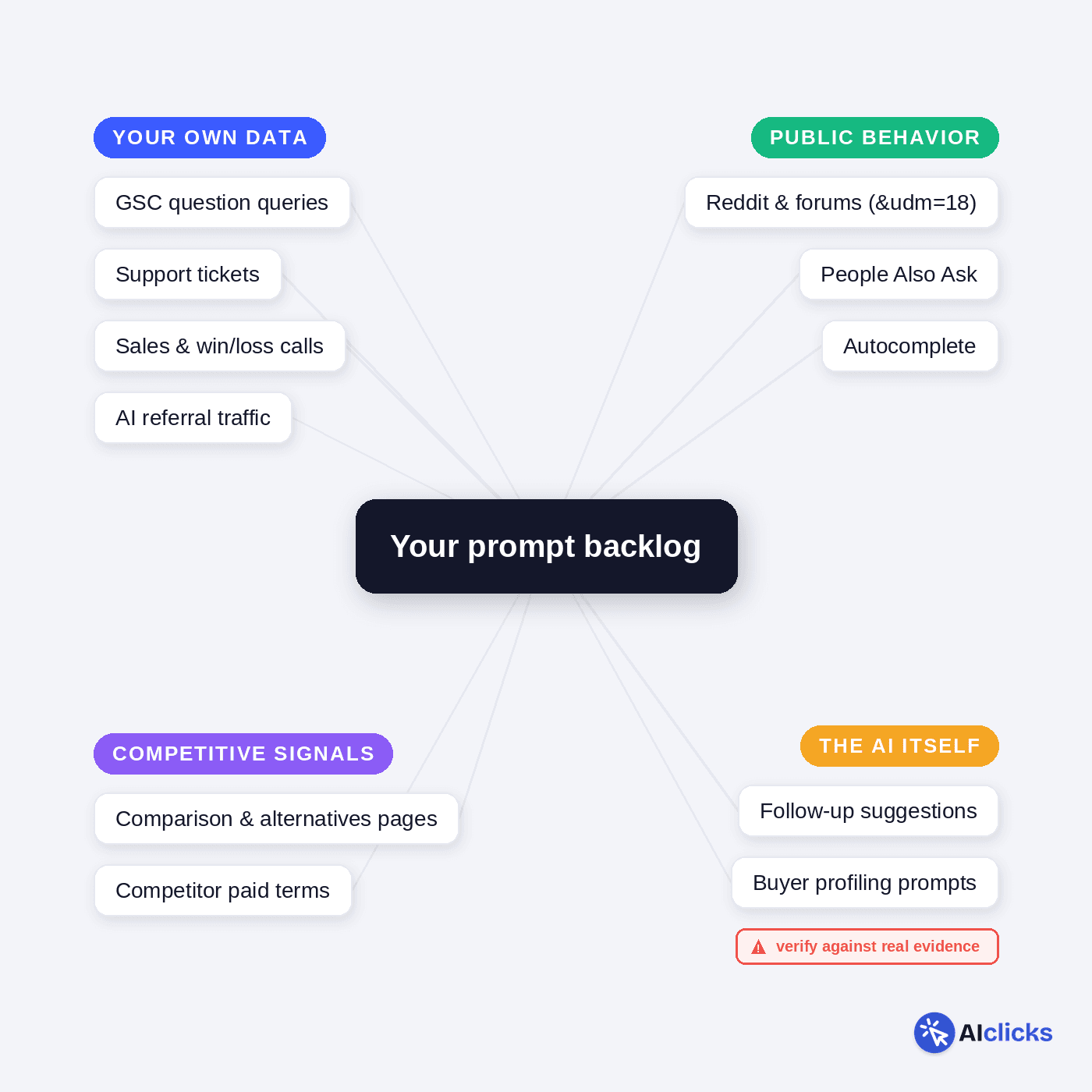
Sourcing comes before selecting, and there's one rule that governs all of it: don't invent prompts in a meeting. You will write the prompts you would type, and you are not your buyer. You know the category vocabulary too well.
Real buyers are vaguer about the solution and far more specific about their own situation than you'll ever guess. Go where they've already left evidence.
1. Convert the question queries you already rank for
Open Google Search Console and filter your queries with this regex:
\b(why|what|when|are|will|does|should|where|who|how|can|do|is|which|vs|versus)\b
Glen Allsopp shared the core of this approach in Ahrefs' prompt tracking guide. I've added which, vs, and versus, since comparison queries carry the most commercial intent and translate into prompts almost word for word.
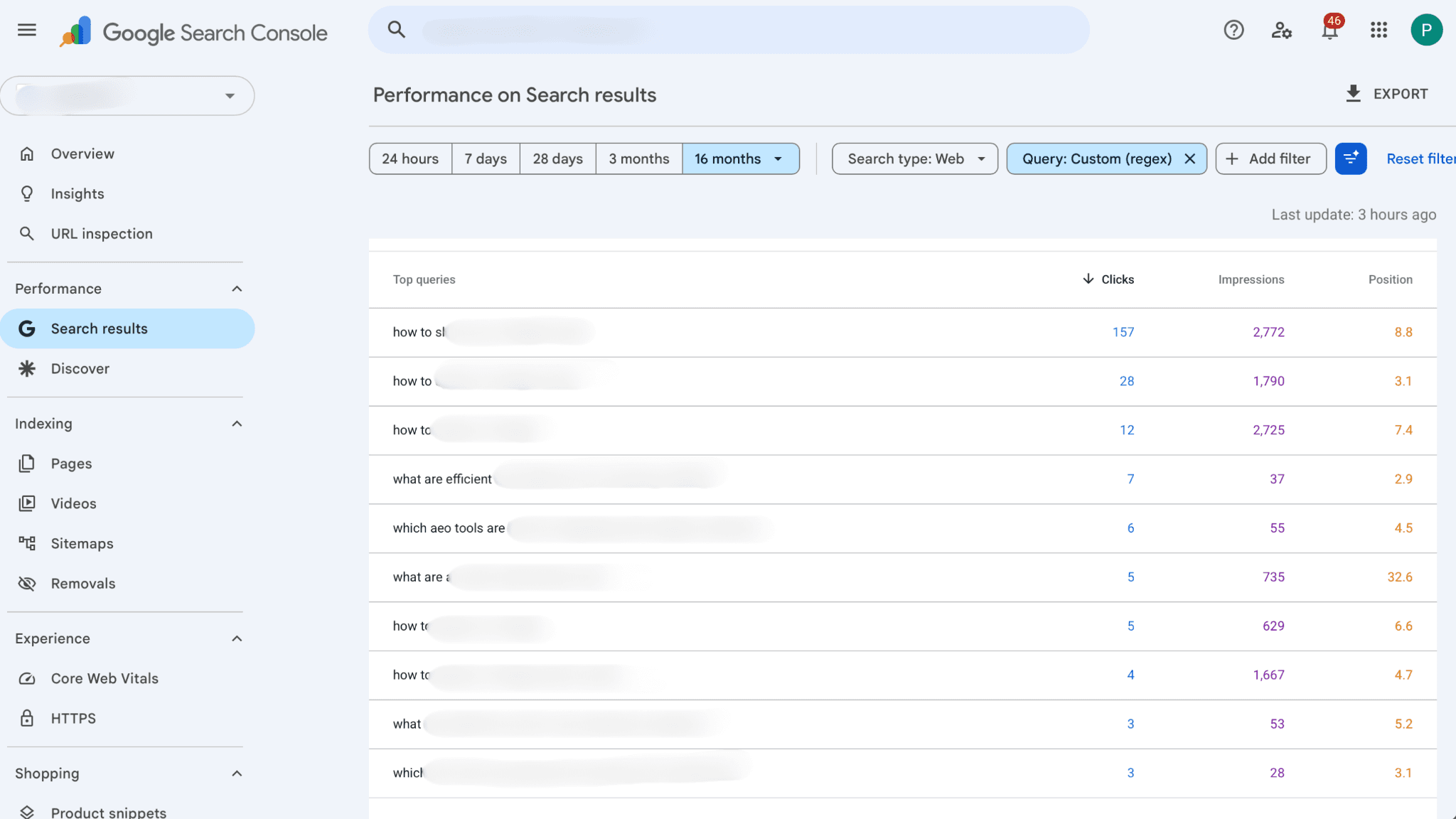
The real prize here is the impression data. There's no prompt volume anywhere in AI search, so a question keyword with real impressions is the closest thing to a demand signal you can borrow.
Rewrite each query as a natural sentence and you have your first prompt cluster.
2. Mine your support tickets and chatbot logs
Your support inbox can act as a goldine for prompts. Six months of support tickets is a transcript of real people describing real problems in their own words.
"We kept losing track of which rep owned which deal" converts directly into "how do small sales teams stop deals from slipping through the cracks," and that phrasing came from an actual customer, which puts it closer to how the next buyer will prompt an AI than anything your team composes.
If you run a support chatbot, even better. Those logs are literally your users practicing how they talk to AI.
What makes this source better than most is that it's written in unedited customer language. No marketer has cleaned it up, which means it matches how prompts actually get typed: casual, specific, occasionally misspelled. Track those verbatim where you can.
3. Pull questions from sales calls and win/loss interviews
Sales calls capture the questions people ask when money is actually on the table, which makes them worth more than any keyword export.
And the timing works in your favor: a growing share of those same questions now get asked to ChatGPT first, before the buyer ever agrees to a demo.
If calls run through Gong, Fathom, or Fireflies, search the transcripts for question marks and skim what comes before them. No call recording? Ask each rep for the five questions they answer on every single demo. You'll get near-identical lists, and that repetition is the signal.
Win/loss interviews deserve a separate pass. When a lost deal says "we went with X because it handled multi-entity reporting," that sentence converts straight into a prompt: "best [category] tool for multi-entity reporting." Losses tell you which prompts you need to win, not just which ones exist.
4. Read Reddit the way the models do
Reddit sits inside the training data of nearly every major LLM and keeps showing up as a cited source in live answers, so the phrasing in subreddit threads has a direct line into how models understand your category.
A thread titled "what's everyone using for uptime monitoring now that X raised prices" isn't just market research but the language the models have already digested.
Find the three or four subreddits where your buyers complain and search the recurring formats: "what do you use for," "alternatives to," "is X worth it." Sort by top posts this year, not recent, since high-engagement threads are the ones models weight.
Harvest two things: the question titles, which convert into prompts almost unedited, and the constraints buyers name in comments. Those constraints are what separate a generic prompt from one your customer would actually type.
Another simple way: just type the query in Google search, and click on “Forums,” and you can find relevant threads you can contribute to.
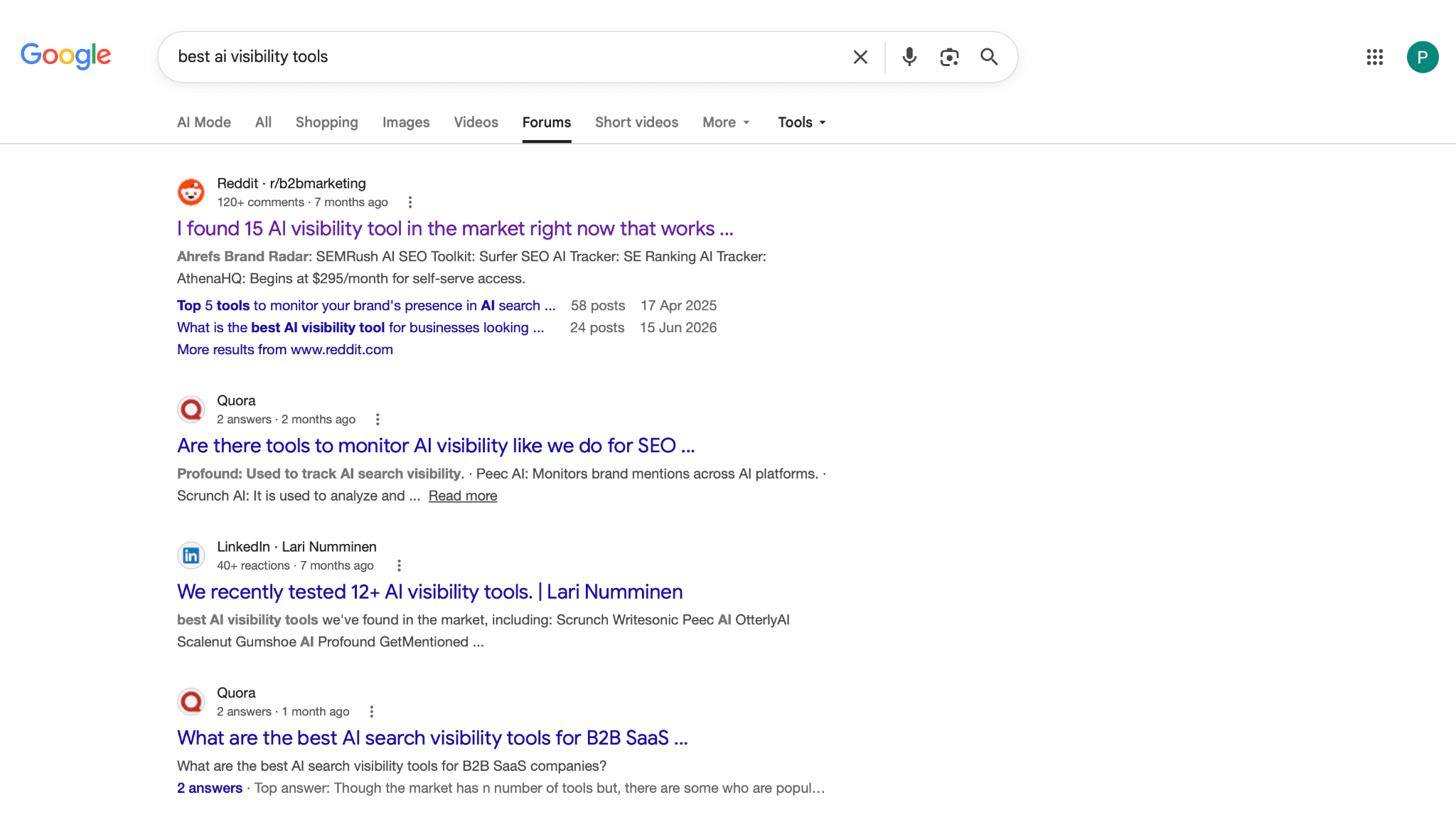
Or, you can also skip the manual work completely. Just go to the Sources tab in AIclicks and filter by Reddit, and it shows which pages AI models actually cite when answering prompts in your category, and Reddit threads show up there constantly.
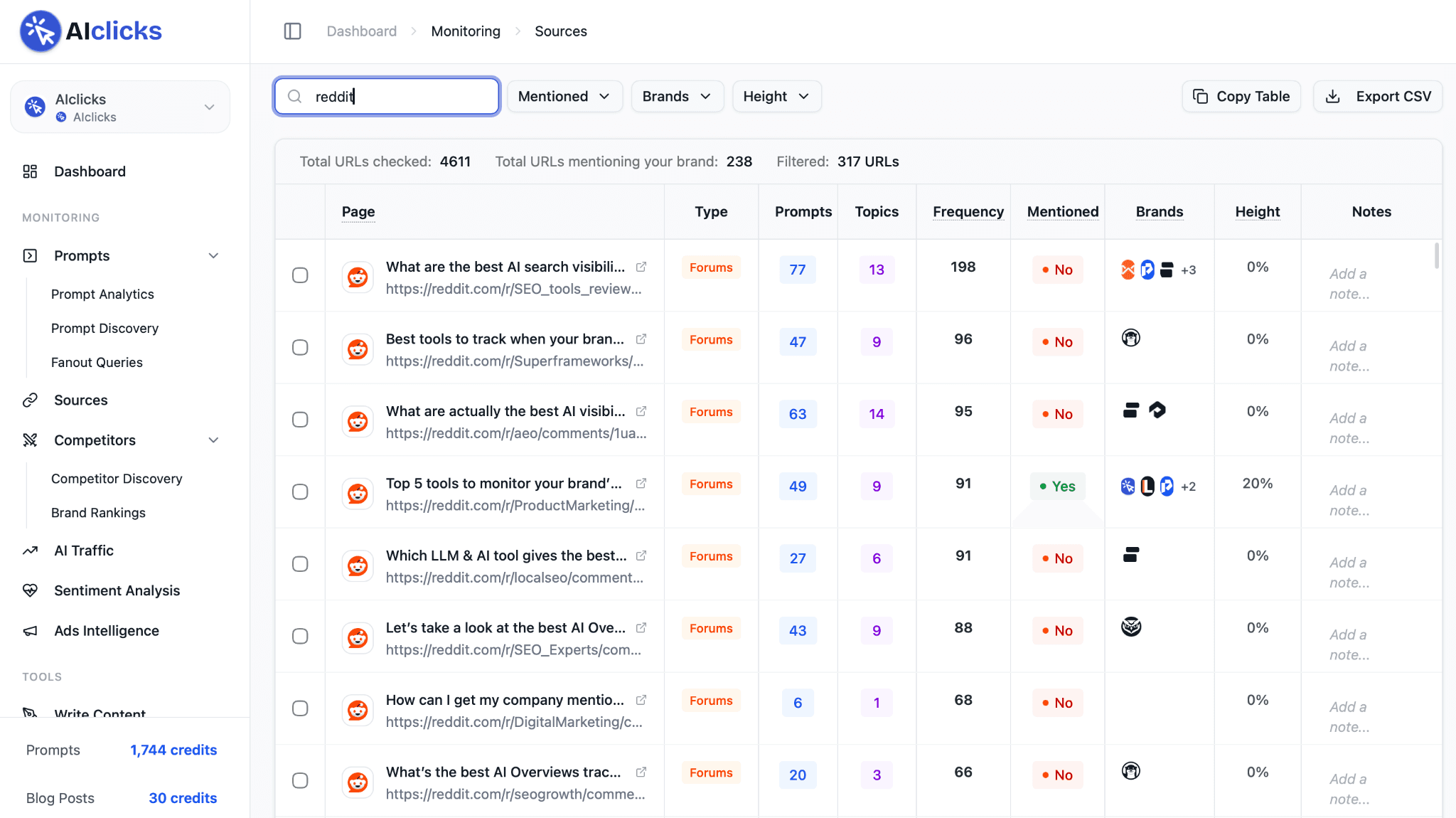
Instead of hunting for threads that might matter, you start from the ones already shaping answers.
Learn more about why Reddit is frequently cited by LLMs and how to use Reddit for AI citations.
5. Harvest the AI's own follow-up suggestions
The models will tell you what to track if you let them.
Run three or four starter prompts in your category through ChatGPT and Perplexity, then collect every suggested follow-up question.
Those suggestions are the model's own prediction of what a real user asks next, generated from patterns across millions of conversations. It's the closest thing to free prompt-volume data that exists, and almost nobody harvests it systematically.
The method is simple.
Start with five seed prompts from your earlier sources, run each through ChatGPT and Perplexity, and log every suggested follow-up.
Then run the interesting follow-ups and log theirs.
Two levels deep is usually enough; past that you drift into questions nobody asks.
Twenty minutes of this maps the conversation tree around your category, including branches your keyword data never showed you.
6. Expand autocomplete and People Also Ask
Google autocomplete and People Also Ask were built for keyword research, but both are fed by real query logs, which makes them a free window into how people phrase questions at scale.
Type your category into Google and cycle through the modifiers: "your category + for," "+ vs," "+ with," "+ without," then walk the alphabet after the seed term to shake out long-tail phrasings.
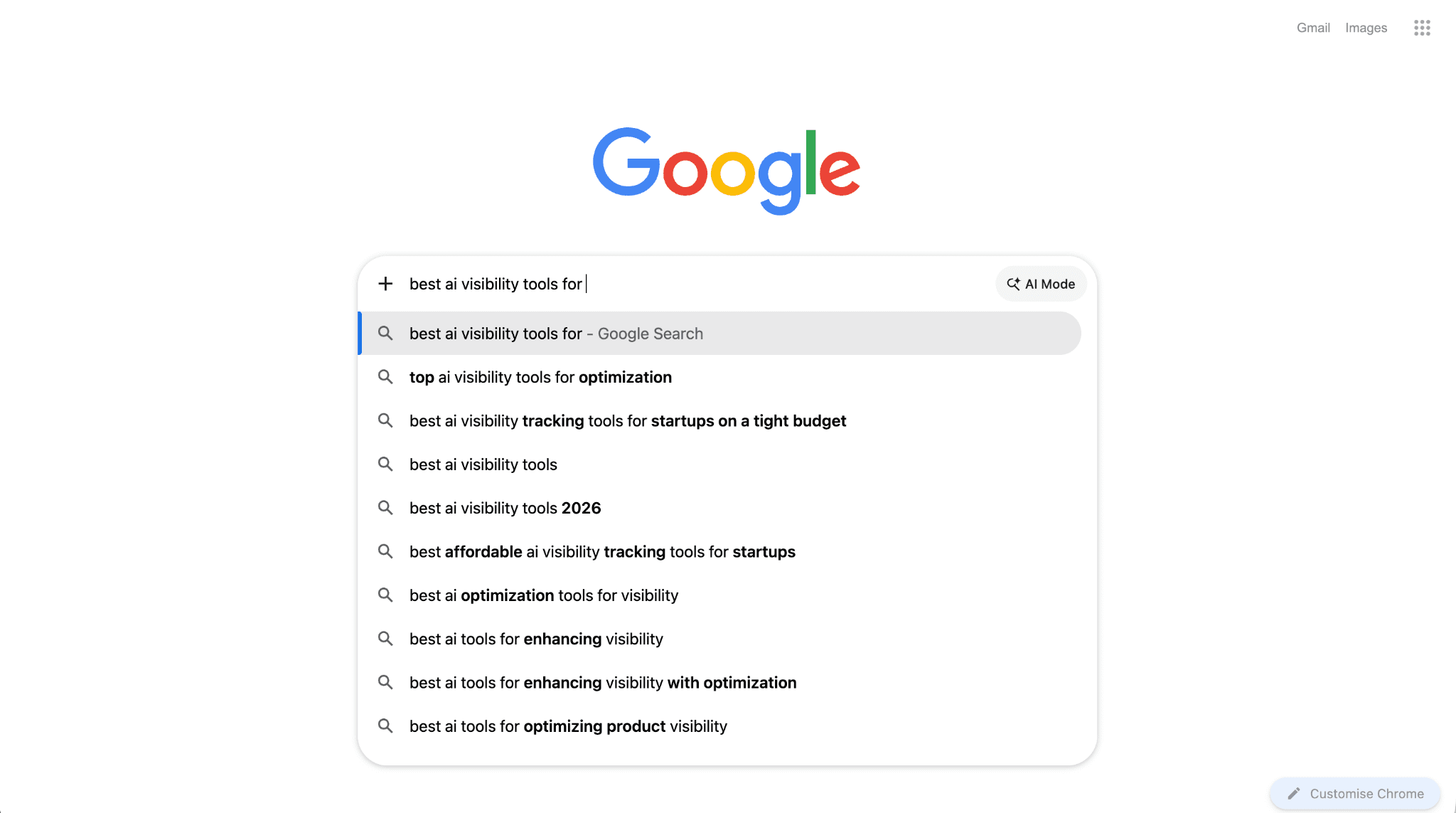
For PAA, click two or three questions open and Google keeps loading more, each one a variation someone has actually searched. Tools like AlsoAsked will map the whole tree for you if you'd rather not click for an hour.
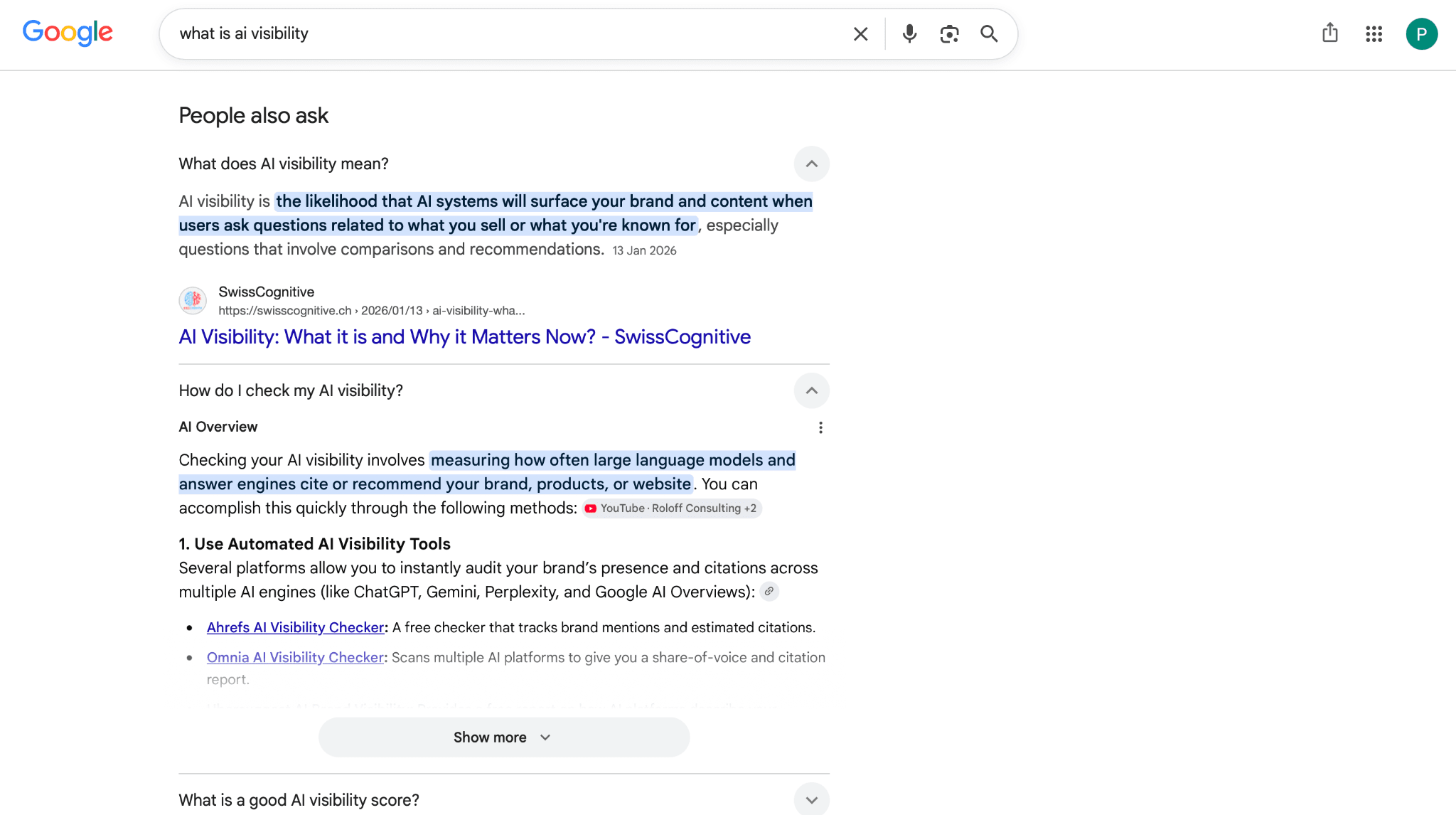
One adjustment before anything goes into your tracking set: these are Google-shaped queries, clipped and keyword-ish. People write to AI in fuller sentences, so "GEO tools small business cheap" needs to become "what's a cheap GEO tool for a small business" before it earns a slot.
7. Reverse-engineer comparison and alternatives pages
Search "[competitor] alternatives" and "[competitor] vs" and read what surfaces: G2 grids, Reddit threads, and the competitors' own comparison pages. Every one of those pages is a map of how buyers frame a decision in your category.
A page titled "X vs Y for small agencies" exists because that comparison happens, and a comparison common enough to earn a landing page is a comparison buyers are also running through an AI.
Pay attention to the pairings you're missing from, not just the ones you're in. If buyers keep comparing two rivals and your name never enters that conversation, that's a prompt worth tracking precisely because you're absent from it. You can't fix an answer you never see.
Then turn each pairing into two or three phrasings a buyer would use: "is X better than Y for [use case]," "cheapest alternative to X that still does [feature]," "why do people switch from X." These prompts do double duty. They track your visibility, and they show you the exact sales pitch the AI gives when someone shops your category without you in the room.
8. Steal your competitors' paid search terms
A competitor bidding real money on "GEO tools for ecommerce" has validated with their own budget that the term converts.
Pull their paid keywords through any competitive research tool, keep the three-word-plus commercial terms, and convert the strongest into questions.
"GEO tools for ecommerce" becomes "what GEO tools should an ecommerce brand use" or "how do I track my Shopify store's visibility in ChatGPT." Same buyer, same intent, just phrased the way it reaches an AI instead of an ad auction.
Their ad spend did your intent-qualification for free.
9. Ask the model to profile your buyer (carefully)
Prompt ChatGPT or Gemini: "Someone is evaluating [category] for the first time. List 15 questions they'd realistically ask an AI before deciding."
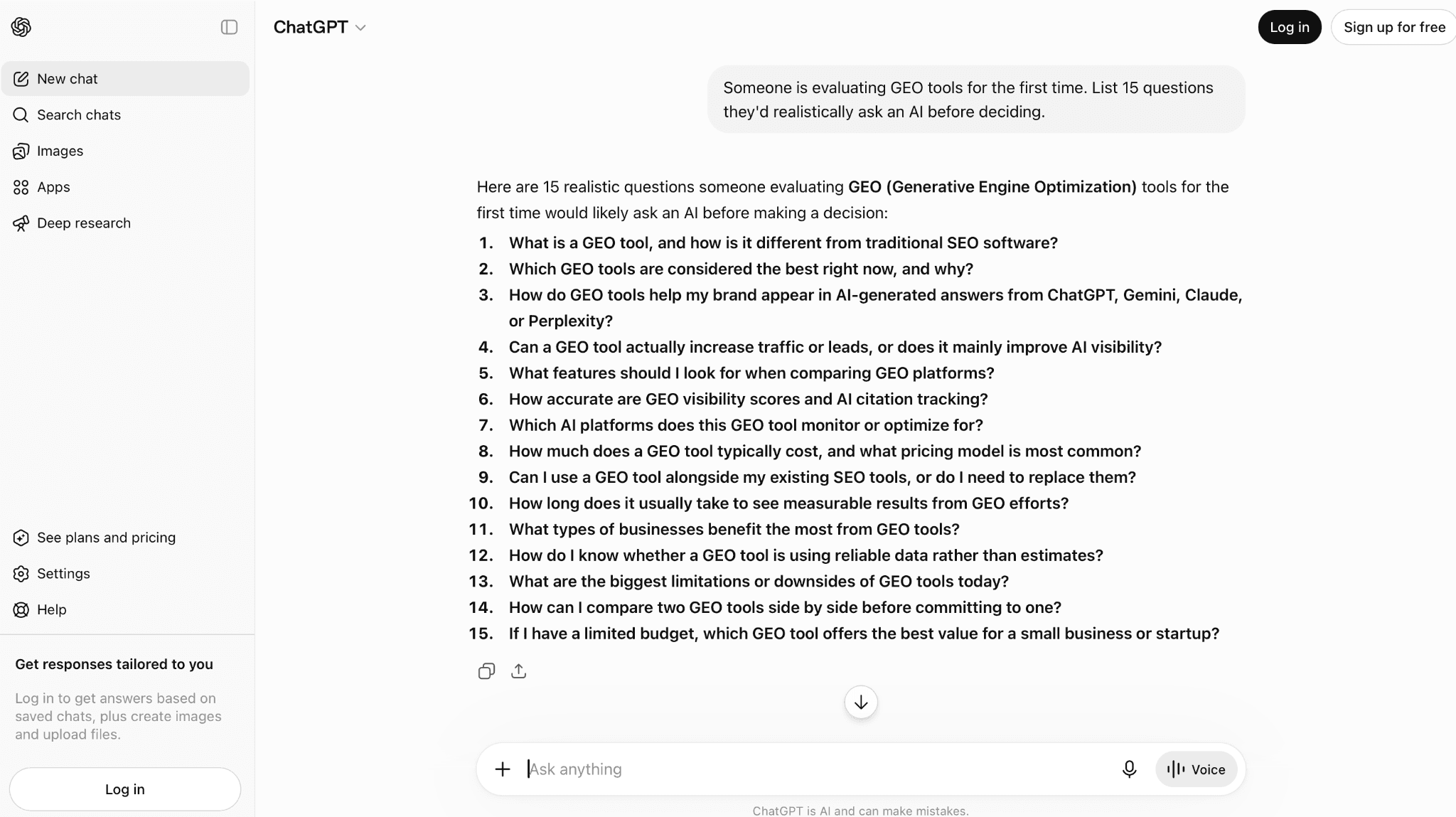
Then a second pass for worries and objections.
Treat the output as a first draft, not a source of truth. The model generates plausible questions, and plausible is not the same as real.
Cross-check anything it produces against sources 1 through 8 before it earns a tracking slot. Synthetic prompts validated by real evidence are fine. Synthetic prompts alone put you back in the brainstorm-meeting trap with extra steps.
10. Follow your AI referral traffic backwards
Check your analytics for sessions arriving from chatgpt.com, perplexity.ai, gemini.google.com, and copilot.microsoft.com.
Each landing page implies the prompt that produced the visit, and unlike everything else on this list, the evidence isn't what buyers might ask but what already sent you a human.
A steady trickle from Perplexity to your pricing page means cost questions are pulling you into answers, so two or three phrasings of that question belong in your set.
One cross-reference worth running if you monitor citations in AIclicks or a comparable tracker: pages that earn AI citations but no referral sessions are shaping answers invisibly. The prompts they get cited for belong in your set too.
The volumes will look small next to organic. Ignore that. These clicks survived a brutal funnel: someone asked, the model mentioned you, cited a page, and the person still clicked. Prompts reverse-engineered from that chain deserve slots ahead of almost anything you brainstormed.
How Do You Filter The List Down to What's Worth Tracking?
Sourcing done well leaves you with 100+ prompts. But most of them shouldn't be tracked. So, run each through these filters, in order.
1. The deal-loss question
If a competitor appeared in this answer instead of you, would it plausibly cost a deal? This single question filters faster than any scoring rubric.
"What is generative engine optimization" fails it for almost everyone. "Best GEO tool for a mid-size agency" passes for anyone selling one.
2. The influence test
Can you realistically change your presence in this answer within two quarters, through content, digital PR, or product positioning?
If the AI answer is built entirely from Wikipedia and government sources you have no path to displace, tracking it will only show you a number you can't move. Keep one or two for context, but give the tracking slots to prompts where you can actually compete.
3. The contamination check
Separate branded prompts into their own group, always. When your name is in the prompt, you show up in the answer by default. The model is pulling up information about you, not picking you out of a field of competitors, so your visibility there is close to guaranteed and tells you nothing about whether you'd win a real comparison.
Branded prompts are still worth tracking, for sentiment, for accuracy, for catching a model that keeps repeating a two-year-old criticism. Just keep them out of your category numbers, where near-100% branded visibility quietly inflates the average.
4. The persona-variant budget
Persona injection (adding team size, industry, budget to a base prompt) mirrors how real people prompt, and it's worth doing. It's also the fastest way to bloat a set with twelve variants of one question.
Pick your two or three highest-value base prompts and give each two persona variants, maximum. If a variant and its base prompt return the same brand pool for a month, retire the variant.
How Many Prompts Should You Track, on How Many Engines, for How Long?
The most common question at this point is how many prompts you should actually track.
There's no magic number, but the people doing this well converge on a fairly narrow range, and the instinct to track everything is the thing to resist. A single snapshot tells you almost nothing here, so a small set you run consistently beats a huge one you can't read.
The numbers that hold up across the sources above and our own client accounts:
25 to 40 prompts at the start, spread across all four types. Enough for signal, few enough that you'll actually read the results.
2 to 3 engines to begin. ChatGPT plus Google's AI surfaces covers most buyer exposure for most B2B categories; add Perplexity if your audience skews technical.
AIclicks will happily track ten engines for you, ChatGPT through Grok and DeepSeek, and we'd still tell you not to switch them all on in week one. The Ahrefs citation-overlap data is the argument for going beyond one: visibility on one surface predicts surprisingly little about the next.
30 days minimum before you conclude anything. SparkToro's data suggests you need 60 to 100 runs per prompt before the visibility numbers settle. A week of daily runs gives you seven data points, which is not enough to tell a real drop from normal variance.
A pruning schedule. Put a recurring monthly review on the calendar. Any prompt that has produced no insight and no movement for six weeks gets retired and replaced from your candidate backlog. Tracking spend on most platforms scales with prompts × engines × frequency, so a dead prompt costs money twice: once in credits, once in the attention it steals from the two prompts that needed it.
Where AIclicks Fits Into This
You can do everything in this guide with a spreadsheet. Plenty of people do, and honestly, for the sourcing part, a spreadsheet is fine. Where it falls apart is the running: asking the same 30 questions across three engines every day for a month is nobody's idea of a job.
So that's the part we automated. Every prompt in AIclicks runs on every LLM you've enabled once a day, on any plan, which means the 60 to 100 runs you need before the numbers settle just pile up in the background. The setup wizard also takes a first pass at sourcing for you. It reads your site and suggests prompts based on what you actually sell, and then you add the ones you dug up from sales calls and Reddit yourself, either one at a time or as a CSV.
The monthly pruning review is where the dashboard earns its keep. A prompt that hasn't moved or taught you anything in six weeks is easy to spot, and since prompt slots are credits, swapping it for something from your backlog costs nothing.
One more thing worth knowing: the Sources tab lists the pages models cite when answering your prompts, including the pages where competitors get cited and you don't. That list has a way of telling you what to track next.
If you want to see what your first prompt set turns up, get in touch with our team.
Frequently Asked Questions (FAQs)
1. How many prompts should I track for AI visibility?
Start with 25 to 40, spread across informational, comparison, recommendation, and branded types. That's enough for real signal and few enough that you'll actually read the results. Expand only after your first pruning cycle shows you which categories produce insight.
2. Why do AI answers change every time I run the same prompt?
LLMs generate responses probabilistically rather than retrieving a fixed result, so brand lists shift between runs by design. That's why single snapshots are meaningless and visibility is measured as a frequency: the percentage of runs where your brand appears, tracked over weeks.
3. Should I track branded prompts like "is [my brand] good"?
Yes, but separately from your category prompts. When your name is in the prompt, you appear in the answer by default, so branded visibility tells you about sentiment and accuracy, not about whether you'd win a real comparison. Mixing the two inflates your category numbers.
4. Where do I find prompts my buyers actually use?
The richest sources are ones written in real customer language: question queries from Search Console, support tickets and chatbot logs, sales call transcripts, Reddit threads in your category, and the landing pages of your existing AI referral traffic. Brainstormed prompts should be the minority of your set.
5. How long before prompt tracking data means anything?
At least 30 days of daily runs. Answer variance is high enough that you need roughly 60 to 100 runs per prompt before visibility percentages settle, and a week of data can't separate a real drop from normal noise.
6. Do I need to track every AI engine?
No. ChatGPT plus Google's AI surfaces covers most buyer exposure in most B2B categories, with Perplexity worth adding for technical audiences. Visibility on one engine predicts little about another, so expand deliberately once your core set is stable, rather than switching everything on in week one.
Any questions left?
Book a call here: