

Reviewed by:
Matas Kibildis

Head of Growth @ aiclicks.io
Last updated:
Expert Verified

" width="14px"><path d="M 13.864 5.629 L 13.3 5.629 L 13.3 5.6 L 7 5.6 L 7 8.4 L 10.956 8.4 C 10.379 10.03 8.828 11.2 7 11.2 C 4.681 11.2 2.8 9.319 2.8 7 C 2.8 4.681 4.681 2.8 7 2.8 C 8.071 2.8 9.045 3.204 9.786 3.864 L 11.766 1.884 C 10.516 0.719 8.844 0 7 0 C 3.134 0 0 3.134 0 7 C 0 10.866 3.134 14 7 14 C 10.866 14 14 10.866 14 7 C 14 6.531 13.952 6.073 13.864 5.629 Z" fill="rgb(255, 193, 7)" height="14px" id="H_YjfTNpn" width="14px"/><path d="M 0 3.742 L 2.3 5.429 C 2.922 3.888 4.429 2.8 6.193 2.8 C 7.264 2.8 8.238 3.204 8.979 3.864 L 10.959 1.884 C 9.709 0.719 8.037 0 6.193 0 C 3.504 0 1.172 1.518 0 3.742 Z" fill="rgb(255, 61, 0)" height="5.428500000000002px" id="PlkthQDhg" transform="translate(0.875 0)" width="10.959199999999996px"/><path d="M 6.232 5.581 C 8.04 5.581 9.683 4.889 10.925 3.764 L 8.758 1.931 C 8.032 2.483 7.144 2.782 6.232 2.781 C 4.411 2.781 2.865 1.62 2.283 0 L 0 1.759 C 1.159 4.026 3.511 5.581 6.232 5.581 Z" fill="rgb(76, 175, 80)" height="5.581099999999999px" id="WlnJ5gngE" transform="translate(0.7 8.4)" width="10.924899999999994px"/><path d="M 6.864 0.029 L 6.3 0.029 L 6.3 0 L 0 0 L 0 2.8 L 3.956 2.8 C 3.68 3.576 3.183 4.254 2.526 4.75 L 2.527 4.749 L 4.693 6.582 C 4.54 6.722 7 4.9 7 1.4 C 7 0.931 6.952 0.473 6.864 0.029 Z" fill="rgb(25, 118, 210)" height="6.589883930775992px" id="x_rSW275p" transform="translate(7 5.6)" width="7px"/></g></svg>)
Pick up any marketing guide (particularly GEO) and it says the same thing: go where your buyers already talk like Reddit threads, LinkedIn posts, Quora answers, and more. Show up, be helpful, build trust.
However, none of them mention what it costs. For example, finding a good thread: ten minutes, reading it properly so your reply makes sense: five more, writing a comment that doesn't sound salesy: another ten. On an average, it’s 25 minutes per comment, so a serious session of ten comments swallows half a day.
No more!
Introducing Engage Online 🎉
A new tab in AIclicks that finds the social posts already talking about your topics, drafts you a human-sounding comment, and drops you onto the post to reply. Joining a conversation takes seconds.
Here's more about the Engage Online feature.
How Engage Online Works
Here's a quick walkthrough of how it works:
Step 1: Open your list, it's already built
Head to the new Engage Online tab and the discussions are waiting, grouped by platform across eight of them: Reddit, LinkedIn, X, Facebook, Instagram, Quora, Hacker News, and Stack Overflow. Our own workspace opened to 126 live Reddit threads and 26 on LinkedIn.
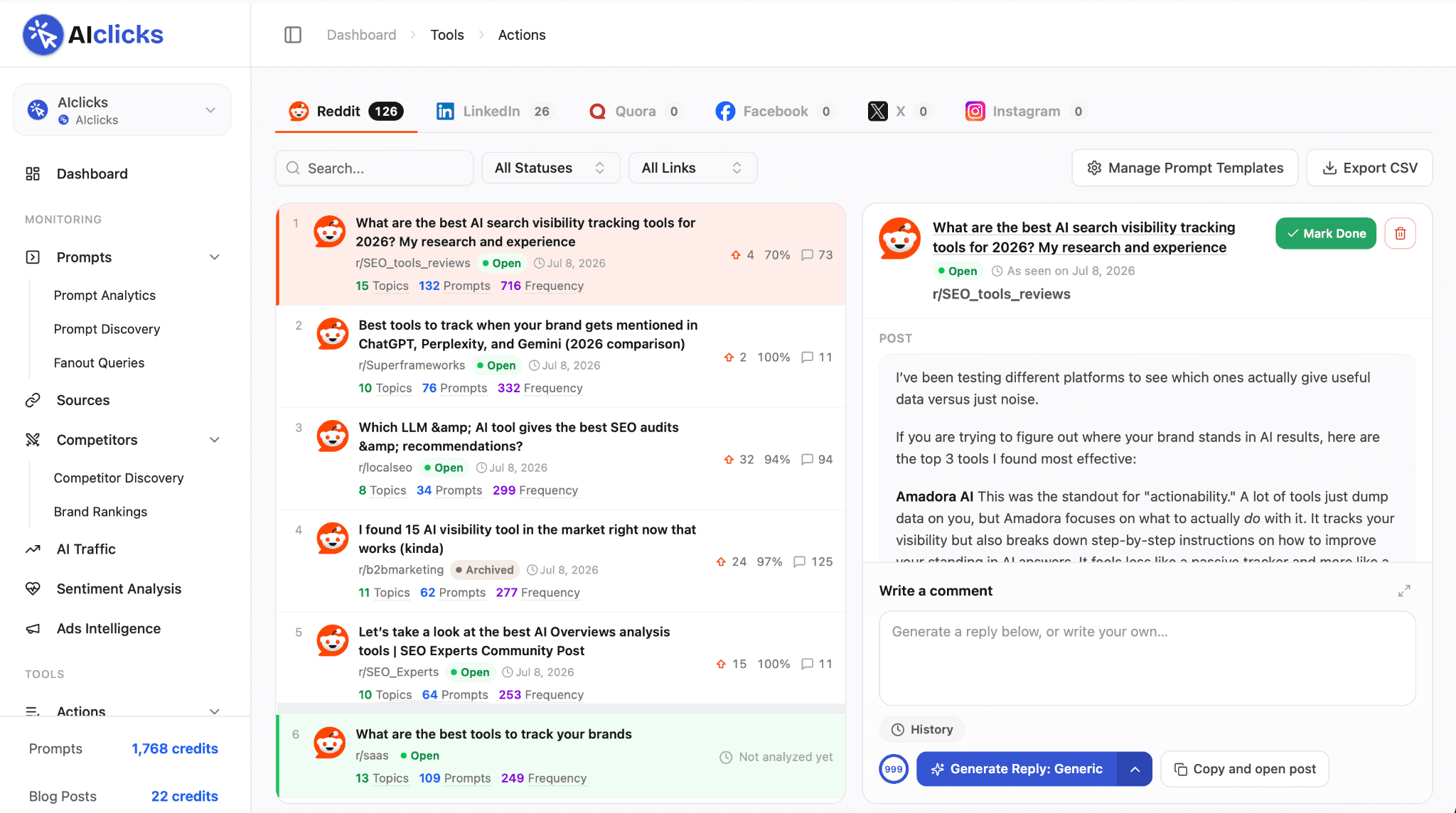
The list comes from where your brand already gets cited. AIclicks watches the sources AI engines pull from when your category comes up, and those same discussions become your work queue.
Step 2: Pick the threads worth your time
Two sets of numbers sit under each post.
The first is live engagement: upvotes and upvote ratio on Reddit, likes and comments on LinkedIn and Instagram, views and reactions on Facebook, likes and replies on X, answers on Quora. A thread at 24 upvotes with 125 comments gets your attention today; a quiet one can wait.
The second is the part only AIclicks can show you: how each thread connects to your tracked prompts. A discussion tagged 15 Topics, 132 Prompts, 716 Frequency touches 132 of the prompts you track, seen 716 times.
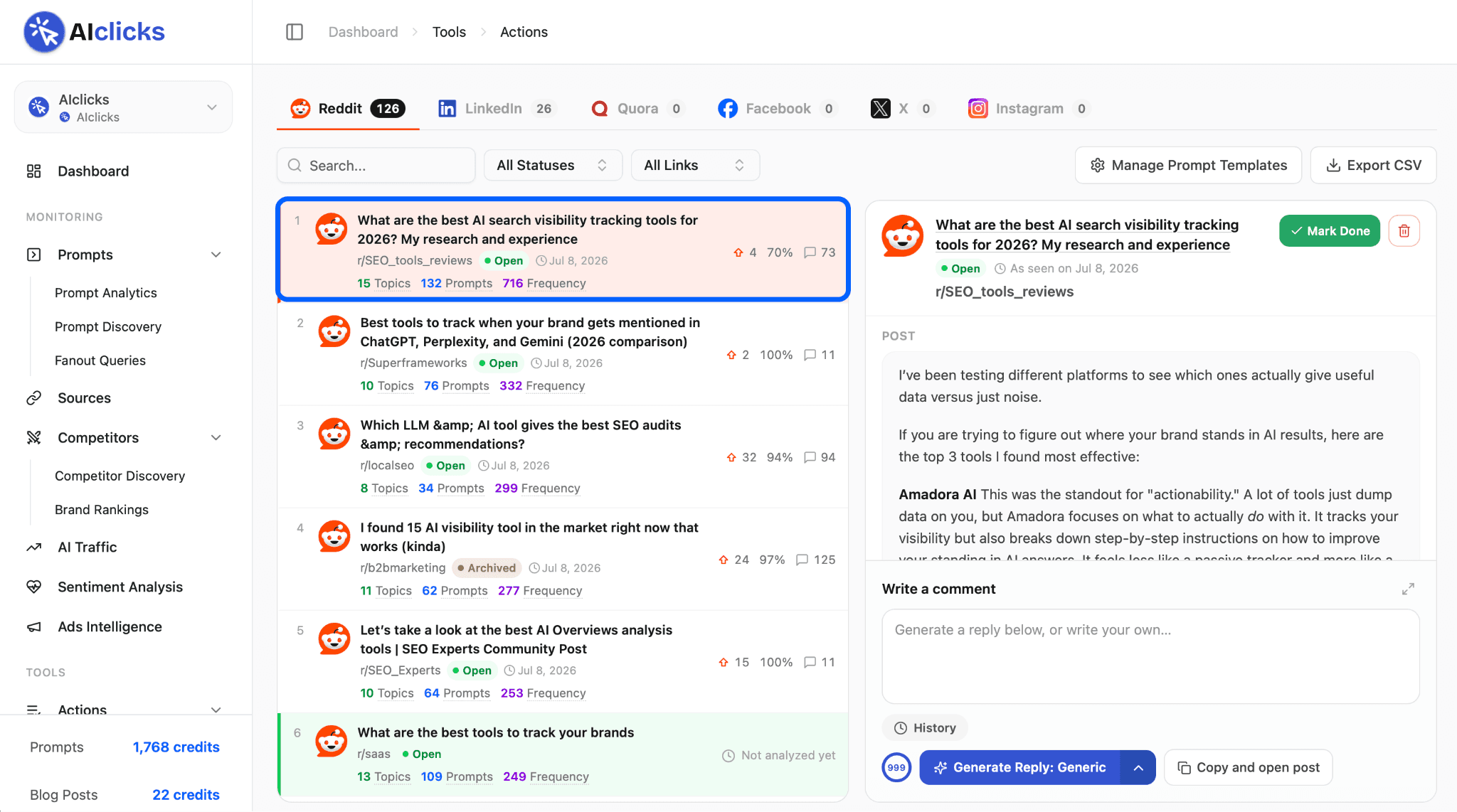
One line tells you how much of your AI visibility runs through that single thread.
Step 3: Generate a comment in your style
Select a thread and the full discussion opens beside the list, with a comment box under it.
Generate a reply in one of three styles:
Generic: a balanced, helpful reply
Short: one or two punchy sentences
Non-Branded: pure advice, zero product mention
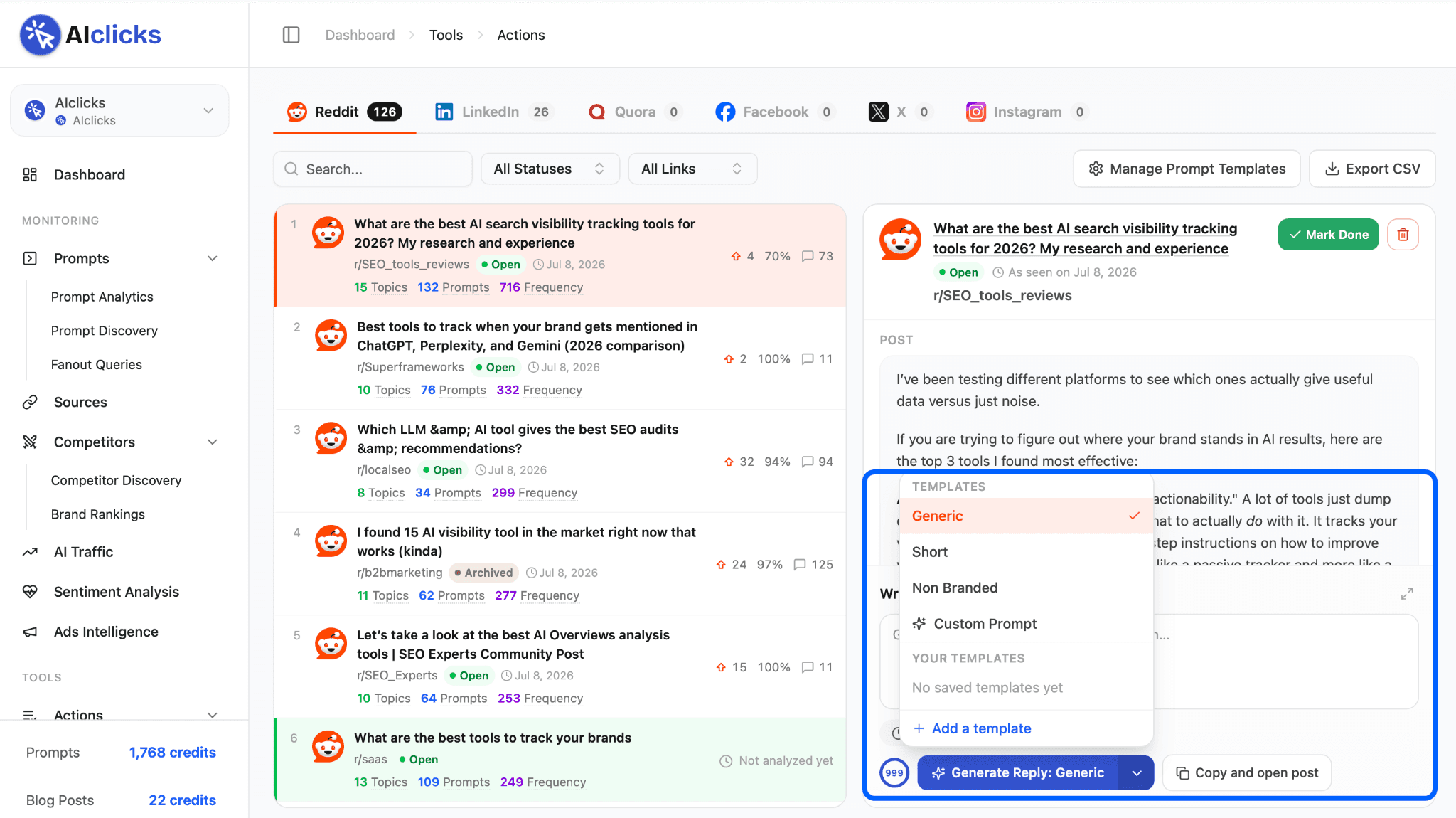
Every style is tuned to read like a genuine community member: no hype, no emojis, no exclamation marks.
Want tighter control? Type a custom instruction for a one-off, or save reusable templates per brand so your whole team replies in one consistent voice. Every generation lands in a per-post history you can restore.
Step 4: Copy, land on the post, reply
Hit "Copy and open post" and the thread opens in a new tab with your comment on the clipboard. You paste, make any final edit, and reply from your own account, the way communities expect.
Back in AIclicks, mark the post done and move to the next one. Filter by platform, search discussions, hide archived or removed threads, and export the whole queue to CSV when you want to plan in a spreadsheet.
Why Use Engage Online
These discussions pay you twice: Buyers read them today, and AI engines cite them for months: when ChatGPT recommends tools in your category, its sources are threads exactly like these. Every comment you place works for both audiences at once.
The replies are built to survive moderators: Communities spot marketing in the first sentence and remove it on sight. So every draft is written to hold up as a contribution: useful first, brand mention optional, and a Non-Branded mode for threads where advice alone is the right move. You post each comment yourself, from your own account, with your final edit, which keeps you welcome in the communities that matter.
A week of engagement fits in one sitting: Working these threads used to be the least scalable channel in marketing. With the hunting and first drafts handled, a solo founder can cover a week's worth of relevant conversations across eight platforms without a social team.
Key Features of Engage Online
Find posts for you across 8 platforms: Reddit, LinkedIn, X, Facebook, Instagram, Quora, Hacker News, and Stack Overflow, filled automatically from where your brand already gets cited.
Get live numbers on every thread: Upvotes, upvote ratio, likes, comments, views, reactions, and replies, pulled per platform, so you can pick the busiest discussions first.
Three comment styles, one click: Generic for a balanced reply, Short for one or two punchy sentences, Non-Branded for pure advice with zero product mention.
Custom prompts and saved templates: Type an instruction for a one-off, or save templates per brand so the whole team replies in one consistent voice.
Copy and reply in one action: Copy opens the post in a new tab with your comment on the clipboard, a nudge reminds you to mark it done, and every generation is saved in a per-post history you can restore.
Simple list management: Filter by platform, search discussions, hide archived or removed threads, and export the queue to CSV.
Manual Engagement vs Engage Online
Before | Now |
Manually search Reddit, LinkedIn, Quora for relevant threads | The relevant posts are collected for you, grouped by platform |
Guess which threads are active | Live upvotes, likes, comments, and views shown on each post |
Write every comment from scratch, risk sounding salesy | One-click draft in 3 human-sounding styles, or your own template |
Copy, hunt for the post, paste, repeat | Copy and land on the post in one action, history saved |
Good to Know
Hacker News and Stack Overflow discussions surface as links for you to open and work manually; comment drafting runs on the other six platforms.
And some posts, especially Instagram and Facebook threads behind login walls, can't always be fully analyzed. When that happens, the post is labeled "Not analyzed yet" so you know exactly where it stands.
Get Started
Engage Online is live for subscribers under Engage Online in your AIclicks dashboard. Open it, sort by the busiest threads, and work a week's worth of conversations in one sitting.
Got a feature you want to see next? Send it our way on our feature request board. Enjoy!



Any questions left?
Book a call here: